
Printed Lightboxes or Digital Screens: Comparing the Science Behind Visual Displays
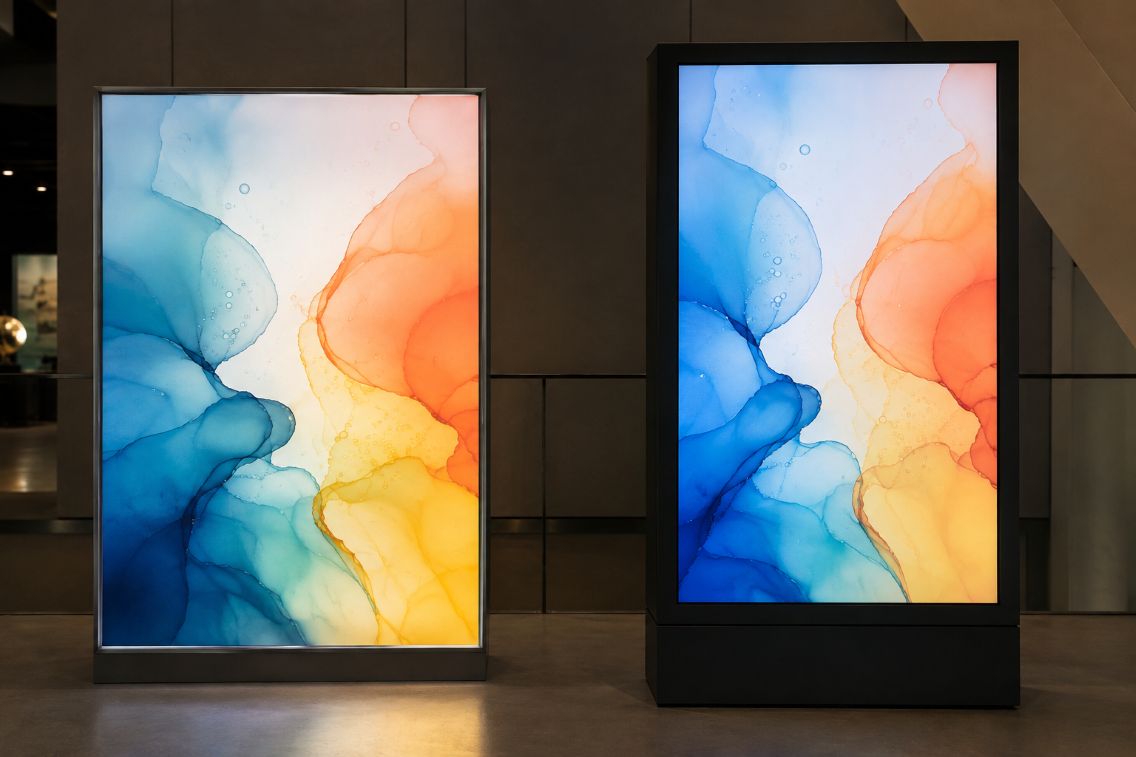
Matching Displays in a Science Museum

Visual displays work by controlling light that reaches the viewer’s eyes. A printed lightbox sends illumination through a translucent image, while a digital screen creates changing images with electronically controlled pixels. Both systems can produce bright, detailed graphics, but their physical behavior leads to different strengths, costs, and practical uses.

Printed lightboxes place a translucent graphic between the viewer and an internal light source. Materials commonly described as Duratrans are designed for this type of application, allowing light to pass through printed colors. Digital screens instead regulate light across thousands or millions of pixels, enabling motion, scheduled messages, and frequent updates.

The Case for Printed Lightboxes

A lightbox offers operational simplicity. Once the graphic is installed and the fixture is switched on, the image remains stable. It does not require content-management software, network access, media players, or routine system updates. This can be useful in museums, transport facilities, laboratories, and retail environments where one image must remain visible for an extended period.

Image consistency is another advantage. The printed graphic cannot unexpectedly change because of a software error or connection failure. Its appearance still depends on the light source, ink, film, and surrounding illumination, but careful production can control these variables. The International Color Consortium explains that device profiles help reproduce colors consistently across cameras, monitors, and print processes.

Modern lightboxes frequently use LEDs. The U.S. Department of Energy identifies LED lighting as the most energy-efficient lighting technology currently available and notes that it can reach high levels of luminous efficacy. LEDs also direct illumination efficiently, making them well suited to the shallow, evenly lit structures used for display graphics.

The Case for Digital Screens

Digital signage has a clear advantage when information changes regularly. One screen can present several messages, animations, videos, live measurements, or emergency notices without requiring a physical graphic to be replaced. Updates may also be scheduled across multiple locations, which helps organizations coordinate time-sensitive communication.

This flexibility comes with more technical requirements. A digital installation may include a display panel, media player, network connection, software platform, and remote administration system. Each component creates a possible maintenance point. Screens can also experience software interruptions, failed connections, damaged pixels, or compatibility problems that do not affect a static printed panel.

Energy use deserves careful comparison. Both systems need electricity when illuminated, but consumption depends on size, brightness, operating schedule, and equipment efficiency. The ENERGY STAR criteria for signage displays set separate limits for on, sleep, and off modes. They also account for screen area and maximum luminance, showing why a simple statement that one display type always uses less energy would be misleading.

How Light and Color Behave

The two technologies form images differently. A lightbox’s appearance results from light passing through layers of film and ink. Dense printed areas transmit less light, while lighter areas allow more through. Uneven internal lighting can therefore create visible bright spots or dark zones. The color temperature and spectral qualities of the LEDs may also influence how the printed colors appear.

Digital screens create color through combinations of red, green, and blue light. Their brightness can often be adjusted for changing conditions, while some models use automatic controls. Yet greater brightness is not always better. Excessive luminance in a dim room can cause glare, while strong daylight can reduce perceived contrast and make a screen harder to read.

Calibration matters in both workflows. Guidance from the International Color Consortium states that display calibration and profiling help maintain consistent color and communicate it accurately to other screens, prints, or projectors. A designer should still assess the final display under its intended lighting because human color perception adapts to surrounding brightness and the apparent white point.

Maintenance, Materials, and Updating

Printed graphics require physical handling whenever content changes. Staff must produce, transport, and install a replacement, and the removed sheet may become waste if it cannot be reused. However, the fixture itself can remain comparatively uncomplicated. Cleaning the front surface and checking the LEDs, wiring, and graphic condition may cover much of its routine maintenance.

A digital screen eliminates repeated printing for changing content, but its electronic parts eventually age. Applications such as live sports streaming and global interaction also show why electronic displays need reliable software, connectivity, and data delivery when presenting real-time material. Brightness and color uniformity may shift over time, while media players and software can require support. The U.S. Department of Energy notes that LED output gradually declines during service, so maintenance planning should consider reduced light output rather than treating an illuminated system as permanently unchanged.

Update frequency often becomes the deciding factor. A permanent scientific diagram, directory, or photographic display may suit a printed lightbox. Live transit data, rotating safety instructions, event schedules, or frequently revised research results generally make stronger use of a digital screen’s capabilities.

Choosing According to the Environment

Neither technology is universally superior. Decision-makers should examine ambient light, viewing distance, required brightness, content lifespan, available technical support, operating hours, and replacement procedures. They should also calculate energy and material use over the display’s expected service period instead of comparing purchase prices alone.

Printed lightboxes favor stable presentation, straightforward operation, and carefully controlled imagery. Digital screens favor motion, remote management, and rapid revision. A balanced choice follows the communication task: use a static illuminated graphic when permanence adds value, choose an electronic display when timely change matters, and consider a mixed system when the environment requires both qualities.
8 Surprising Scientific Principles Behind Efficient Heating & Cooling

Efficient heating and cooling rely on principles of physics and thermodynamics. Every HVAC and plumbing system follows the laws of energy transfer to maintain comfort, reduce energy use, and protect building health. Understanding the science behind these systems can make homeowners and technicians more effective at optimizing them. For example, knowing when to call a Frederick MD HVAC repair professional ensures systems operate at peak efficiency and avoid costly breakdowns.

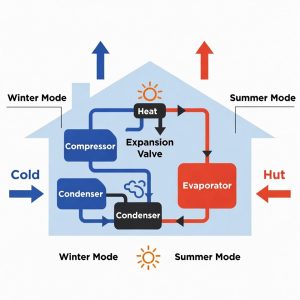
1. How Heat Pumps Extract HeatDiagram of a heat pump in winter and summer cycles

Heat pumps move heat instead of generating it. In winter, they extract heat from the outside air and transfer it indoors, even when temperatures are low. During summer, the process reverses, removing indoor heat and releasing it outside. This cycle relies on refrigerants that change from liquid to gas to absorb and release energy efficiently. The result is a system that heats and cools without burning fuel, saving energy and reducing emissions.

2. Principles of Airflow and Duct Design

Airflow in a building is more than just moving air. Ducts are designed to minimize resistance and turbulence so that air reaches every room evenly. Proper ventilation rates prevent stagnant zones, improve indoor air quality, and maintain consistent temperatures. Engineers use fluid dynamics to calculate optimal duct diameter, bend angles, and fan speeds to reduce energy losses.

3. Humidity Control and Comfort

Humidity affects both comfort and health. High indoor humidity can make rooms feel warmer and increase mold risk, while low humidity can dry out skin and respiratory passages. HVAC systems often include dehumidifiers or humidifiers to maintain ideal levels. Controlling moisture is not just about comfort; it also prevents microbial growth and protects furniture, electronics, and building materials.

4. Energy Efficiency Ratings Explained

Energy efficiency ratios measure system performance. SEER, AFUE, and HSPF are standards used to compare units. SEER measures seasonal cooling efficiency, AFUE measures fuel-based heating, and HSPF evaluates heat pump performance. Higher ratings indicate more energy saved per unit of output. Understanding these metrics helps homeowners make informed decisions when upgrading or maintaining systems.

5. The Role of Insulation and the Building Envelope

A well-insulated home reduces HVAC workload. Insulation slows heat transfer through walls, ceilings, and floors, keeping indoor temperatures stable. Windows, doors, and air sealing are equally important to minimize drafts. When insulation and sealing are optimized, heating and cooling systems run less often, reducing energy use and wear on equipment.

6. Heat Transfer Principles in Action

Heat always flows from warmer to cooler areas. Radiators, floor heating, and cooling coils rely on conduction, convection, and radiation to distribute energy efficiently. Materials with high thermal conductivity, like metals, transfer heat quickly, while slow-conducting materials help retain warmth. Engineers apply these principles to maximize comfort and reduce energy waste. You can read more about how radiators use heat transfer to keep spaces warm in this guide: How Heat Transfer Keeps Us Warm.

7. Why Regular Maintenance Matters

Even the most advanced HVAC systems degrade without care. Clogged filters, dirty coils, and blocked ducts reduce efficiency and may lead to mechanical failure. Routine maintenance preserves system performance, ensures safe operation, and extends equipment life. Scheduling periodic inspections with professionals like those specializing in Frederick MD HVAC repair keeps systems running smoothly throughout the year.

8. Advanced Control and Smart Technology

Smart thermostats and sensors optimize energy use. By monitoring occupancy, outdoor conditions, and indoor air quality, these systems adjust temperature, humidity, and airflow automatically. Algorithms use historical data to predict heating or cooling needs, reducing energy consumption without sacrificing comfort. Integrating smart tech with proper HVAC design ensures maximum efficiency and convenience.

Understanding these eight scientific principles makes a real difference in comfort, safety, and energy efficiency. From heat transfer and fluid dynamics to smart technology and regular maintenance, each factor plays a role in an effective system. Homeowners who recognize the physics behind HVAC operations, and rely on expert support when needed, such as Frederick MD HVAC repair, can enjoy consistent performance and lower energy bills year-round.

Vacuum Insulating Glass: The Science Behind a Smarter Window

Windows do more than let in light. They shape how buildings use energy every day. Standard double‑pane glass still loses heat because air conducts warmth. Scientists looked for a stronger barrier and found answers in a near‑perfect vacuum. When the space between vacuum insulating glass (VIG) panes holds almost no molecules, heat transfer drops sharply.

The Simple Physics of a Vacuum

Heat moves three main ways: conduction, convection, and radiation. Conduction happens as vibrating molecules bump into neighbours. Convection moves heat as warm air rises and cool air sinks. A vacuum removes most molecules, so conduction and convection nearly stop. Only radiation remains, and low‑emissivity (low‑E) coatings can limit that too. The core science is clear: fewer particles mean less heat flow.

VIG starts with two thin sheets of glass. Tiny support pillars, often less than half a millimeter wide, keep the panes from touching under air pressure. Manufacturers heat the edges and seal them with a durable metal or glass solder. Pumps evacuate the gap to pressures lower than a thousandth of atmospheric pressure. A getter material inside absorbs stray gases that leak in over time, helping the vacuum last for decades. The finished panel is only a few millimeters thicker than regular double glazing.

Key Benefits for Homes and Offices

Energy savings: VIG can reach insulation values (U‑values) below 0.5 W/m²·K, twice as good as high‑end triple glazing. This cuts heating and cooling costs year‑round.
Slim profile: Because it needs only two panes, VIG fits in narrow frames where triple glazing cannot. Retrofits on older buildings become easier.
Comfort: Interior glass surfaces stay close to room temperature, reducing cold drafts and condensation. The result is a more stable indoor climate.
Noise control: The vacuum gap blocks sound waves, giving better acoustic insulation than standard windows of similar thickness.
Light weight: With one less pane than triple units, VIG keeps weight down, lowering stress on frames and hinges.

Challenges and Ongoing Research

Making a strong edge seal that can survive fifty‑year temperature cycles is hard. Thermal expansion differences can crack seals if metals and glass do not match perfectly. Researchers test new sealants, such as flexible glass frits, to improve reliability. Support pillars must be nearly invisible; large pillars would create visible dots and thermal bridges. Advances in micro‑fabrication lower pillar size and improve spacing patterns. Cost is falling as factories scale up, but wide adoption still needs further price cuts.

Real‑World Applications Taking Shape

Residential retrofits in cold regions show energy bills dropping up to 20 percent after switching to VIG. Historic buildings in Europe use slim VIG units to keep original wood frames while meeting strict conservation codes. In hot climates like Dubai, VIG combined with solar‑control coatings keeps interiors cooler and reduces air‑conditioning loads. Laboratory clean rooms prize VIG for its steady surface temperatures that help limit condensation. Even refrigeration cabinets now test VIG doors to cut power use in supermarkets.

Environmental Impact Across the Life Cycle

Lower operational energy means fewer greenhouse gas emissions year after year. Most life‑cycle analyses show VIG paying back its embodied energy in less than three years in cold regions. Thinner glass uses less raw material than triple glazing. Seals contain small amounts of lead or bismuth in some designs, so end‑of‑life recycling plans must handle them with care. Manufacturers are testing lead‑free seals to make recycling simpler.